TMU ClubHub

UI/UX Design, UX Research, Wireframing, User Testing, Prototyper

February - April 2024

Figma & Miro

Mobile views presenting a chat and a map view

Project info

The Challenge

How might we create a centralized, efficient, and up-to-date platform that helps TMU students easily discover clubs and events, while creating a stronger sense of engagement and community on campus?

Scope

Most of Toronto Metropolitan University's (also known as TMU) sites for clubs and events are outdated or lead to dead links. This makes finding events on campus more difficult for students who wish to be involved. When I created this project, TMU had three main sites for clubs and events - Student Groups, Recreational, and Organizations. While all three were active at the time, the Recreational and Organizations sites have since become inactive, highlighting the need for a centralized, reliable platform for student engagement.

Interestingly, about a year after completing this project, TMU partnered with Bounce, an app designed to help students discover university events more easily. This confirmed what I found from the start: students need one platform to find everything, instead of jumping across different sites to figure out what’s happening on campus.

My ideation process focused on addressing this gap early by envisioning TMU ClubHub, a combined, student-centered platform that brings clubs, events, and recreational activities into one place, long before the university moved in this direction.

Process

This project followed a user-centered design approach. I began by researching student behaviors and pain points through surveys, then analyzed TMU’s existing club and event platforms to identify gaps in usability, structure, and accessibility. I combined these insights into clear design goals and used them to guide ideation, scope definition, and information restructuring. This process ultimately shaped TMU ClubHub into a centralized, student-first solution focused on saving time, reducing confusion, and improving campus engagement.

Solution

TMU ClubHub centralizes all TMU clubs, events, and recreational activities into one intuitive platform. Instead of navigating multiple outdated sites, students can quickly discover active opportunities, register for events, and plan ahead - all in one place. The solution prioritizes clarity, accessibility, and time-saving features to better support student engagement and make campus involvement feel more accessible and manageable.
Project info

The Challenge

How might we create a centralized, efficient, and up-to-date platform that helps TMU students easily discover clubs and events, while creating a stronger sense of engagement and community on campus?

Scope

Most of Toronto Metropolitan University's (also known as TMU) sites for clubs and events are outdated or lead to dead links. This makes finding events on campus more difficult for students who wish to be involved. When I created this project, TMU had three main sites for clubs and events - Student Groups, Recreational, and Organizations. While all three were active at the time, the Recreational and Organizations sites have since become inactive, highlighting the need for a centralized, reliable platform for student engagement.

Interestingly, about a year after completing this project, TMU partnered with Bounce, an app designed to help students discover university events more easily. This confirmed what I found from the start: students need one platform to find everything, instead of jumping across different sites to figure out what’s happening on campus.

My ideation process focused on addressing this gap early by envisioning TMU ClubHub, a combined, student-centered platform that brings clubs, events, and recreational activities into one place, long before the university moved in this direction.

Process

This project followed a user-centered design approach. I began by researching student behaviors and pain points through surveys, then analyzed TMU’s existing club and event platforms to identify gaps in usability, structure, and accessibility. I combined these insights into clear design goals and used them to guide ideation, scope definition, and information restructuring. This process ultimately shaped TMU ClubHub into a centralized, student-first solution focused on saving time, reducing confusion, and improving campus engagement.

Solution

TMU ClubHub centralizes all TMU clubs, events, and recreational activities into one intuitive platform. Instead of navigating multiple outdated sites, students can quickly discover active opportunities, register for events, and plan ahead - all in one place. The solution prioritizes clarity, accessibility, and time-saving features to better support student engagement and make campus involvement feel more accessible and manageable.
Research

Key Insights

  • 65% didn’t know TMU had three club/event sites

  • 87.5% discover clubs/events through social media

  • 48% are not currently involved, but 64% want to meet new people through clubs

  • 16/25 students had trouble navigating the schools 3 sites (Student Groups, Recreational, Organizations)

  • The biggest barrier to involvement is time (school, work, commuting)

  • Students want social connection, but felt overwhelmed, unsure where to start, and often found information too late

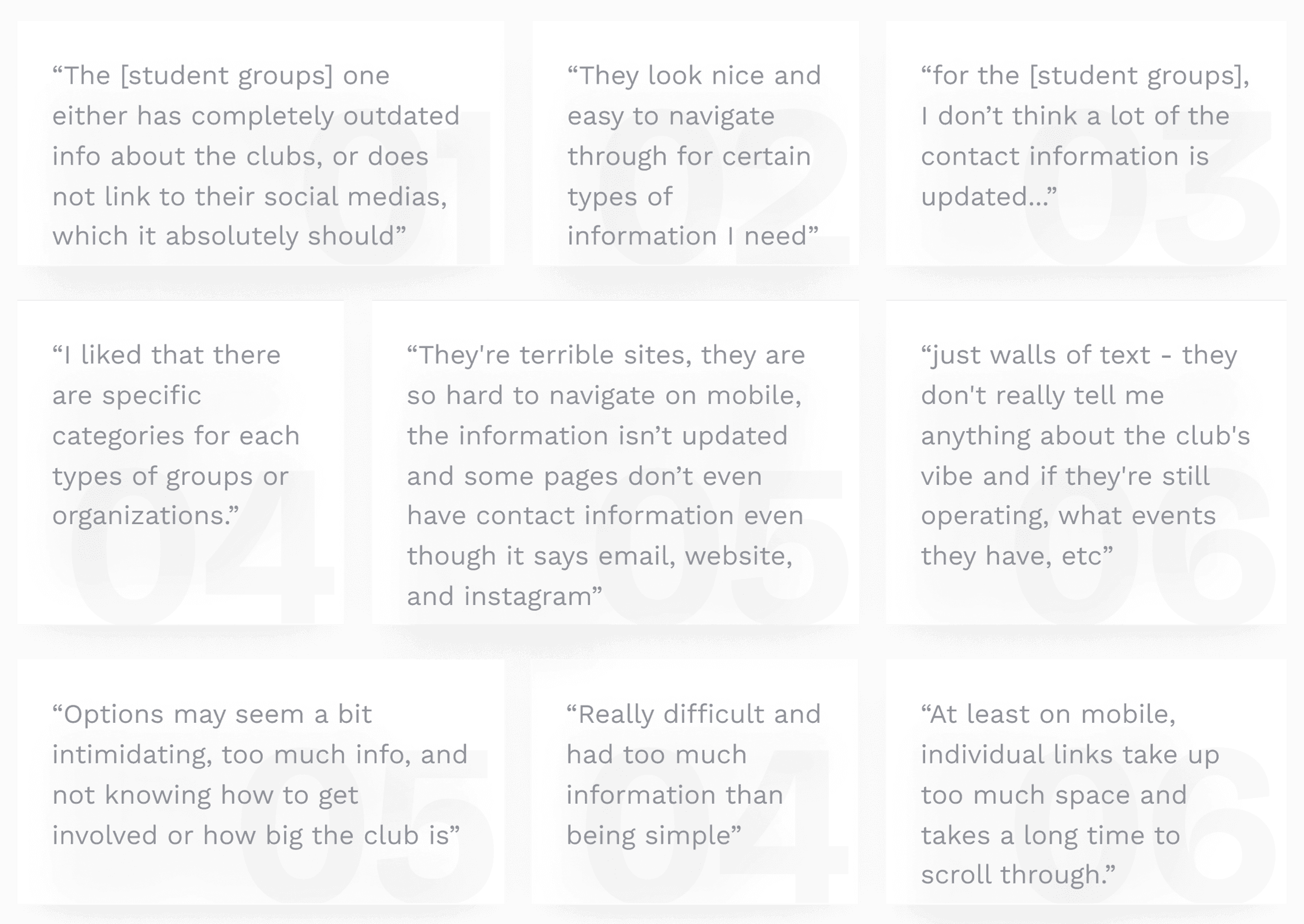
User quotes from survey highlighting pain points with existing TMU platforms.

Empathy & User Perspective

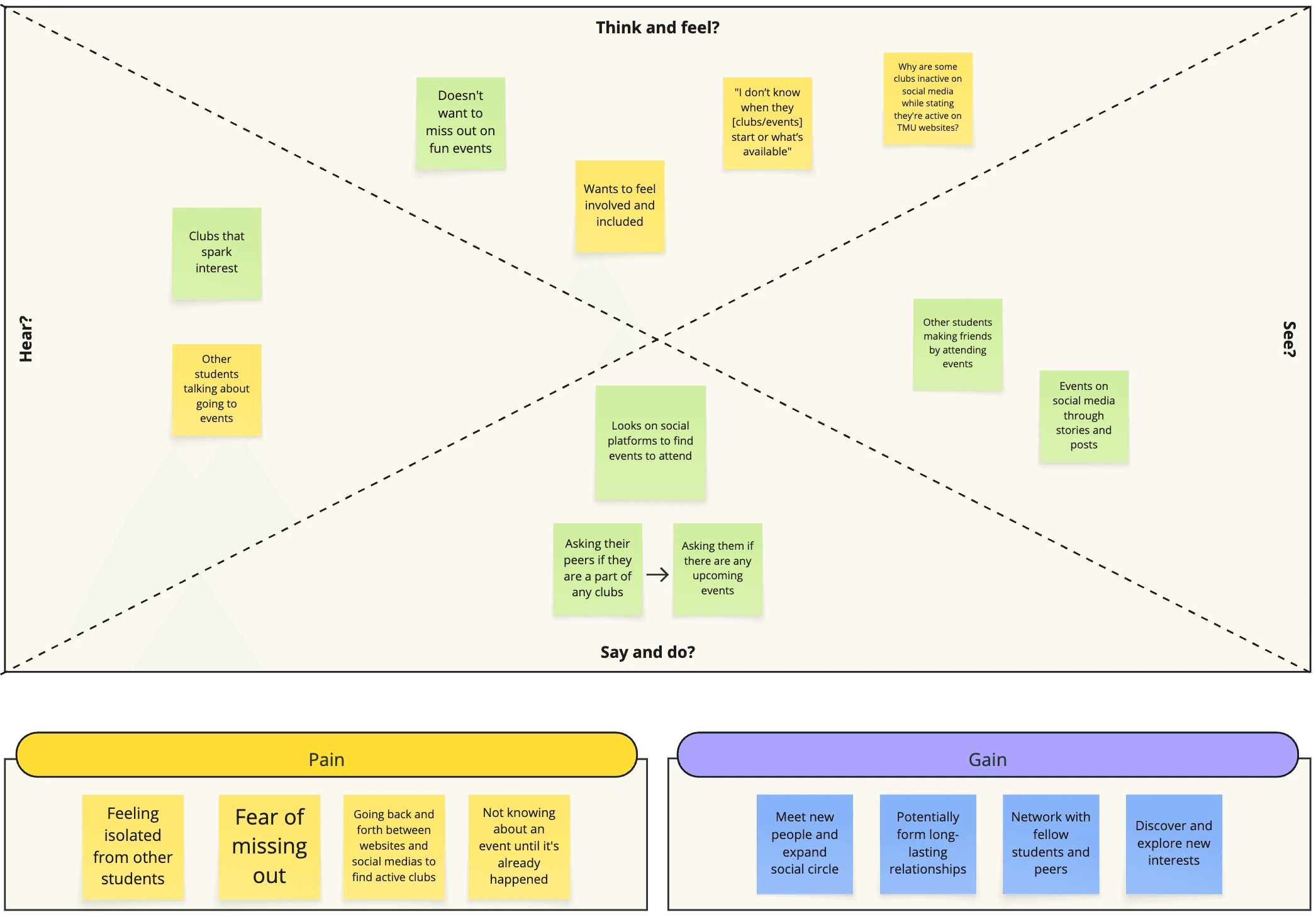
  • I created an empathy map based on survey responses representing the users' common thoughts, feelings, pains, and gains. 

  • Pains: outdated info, fear of missing out, scattered platforms (relying on Instagram because official sites are not reliable)

  • Gains: social connection, belonging, discovery

  • Students want to get involved, but only if it fits into their schedule

This reinforced that the issue wasn’t lack of interest, but access and clarity.

What students think, feel, see, say/do

Research

Key Insights

  • 65% didn’t know TMU had three club/event sites

  • 87.5% discover clubs/events through social media

  • 48% are not currently involved, but 64% want to meet new people through clubs

  • 16/25 students had trouble navigating the schools 3 sites (Student Groups, Recreational, Organizations)

  • The biggest barrier to involvement is time (school, work, commuting)

  • Students want social connection, but felt overwhelmed, unsure where to start, and often found information too late

User quotes from survey highlighting pain points with existing TMU platforms.

Empathy & User Perspective

  • I created an empathy map based on survey responses representing the users' common thoughts, feelings, pains, and gains. 

  • Pains: outdated info, fear of missing out, scattered platforms (relying on Instagram because official sites are not reliable)

  • Gains: social connection, belonging, discovery

  • Students want to get involved, but only if it fits into their schedule

This reinforced that the issue wasn’t lack of interest, but access and clarity.

What students think, feel, see, say/do

Research

Key Insights

  • 65% didn’t know TMU had three club/event sites

  • 87.5% discover clubs/events through social media

  • 48% are not currently involved, but 64% want to meet new people through clubs

  • 16/25 students had trouble navigating the schools 3 sites (Student Groups, Recreational, Organizations)

  • The biggest barrier to involvement is time (school, work, commuting)

  • Students want social connection, but felt overwhelmed, unsure where to start, and often found information too late

User quotes from survey highlighting pain points with existing TMU platforms.

Empathy & User Perspective

  • I created an empathy map based on survey responses representing the users' common thoughts, feelings, pains, and gains. 

  • Pains: outdated info, fear of missing out, scattered platforms (relying on Instagram because official sites are not reliable)

  • Gains: social connection, belonging, discovery

  • Students want to get involved, but only if it fits into their schedule

This reinforced that the issue wasn’t lack of interest, but access and clarity.

What students think, feel, see, say/do

Process

Information Architecture

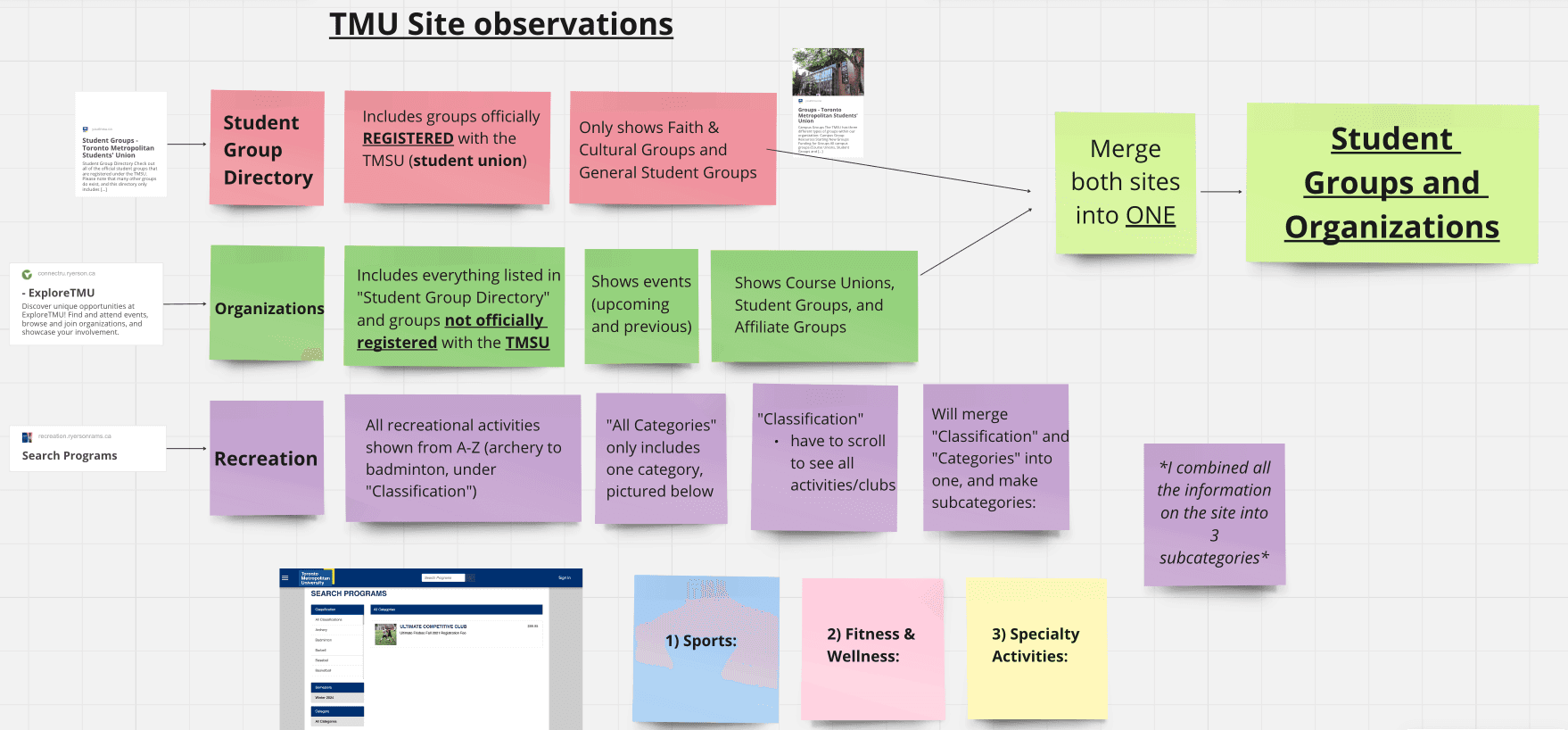
Through site analysis, I identified major structural issues across TMU’s platforms:

Student Groups

  • Only includes clubs officially registered with the TMSU

  • Limited categories

  • Many missing or outdated links

Organizations

  • Includes both registered and unregistered clubs

  • Overlaps heavily with Student Groups

  • No clear distinction between active and inactive clubs

Recreation

  • Activities listed alphabetically under “Classification”

  • Requires excessive scrolling

  • Inconsistent filtering between “Classification” and “Category”

This separation reflected administrative structure rather than how students actually search.


Information Architecture Decisions

  • To reduce confusion and cognitive load, I restructured the information as follows:

    • Merged Student Groups + Organizations into one unified category

    • Reorganized Recreation into three clear subcategories:

      1. Sports

      2. Fitness & Wellness

      3. Specialty Activities

    This approach prioritized interest-based discovery over institutional classification.

My breakdown of the Organizations, Student Group Directory, and Recreational sites

Ideation & Early Concepts 

  • With research and IA insights in place, I began exploring solutions that would:

    • Centralize information

    • Reduce navigation friction

    • Support quick scanning and planning

    Early concepts included:

    • A visual club directory with activity status

    • A master event calendar

    • Interest-based browsing

    • A tab-based navigation system (Clubs, Events, Recreation, Saved)

    I intentionally focused on simplicity and time-saving interactions, knowing that students often browse quickly between classes or on their commute.

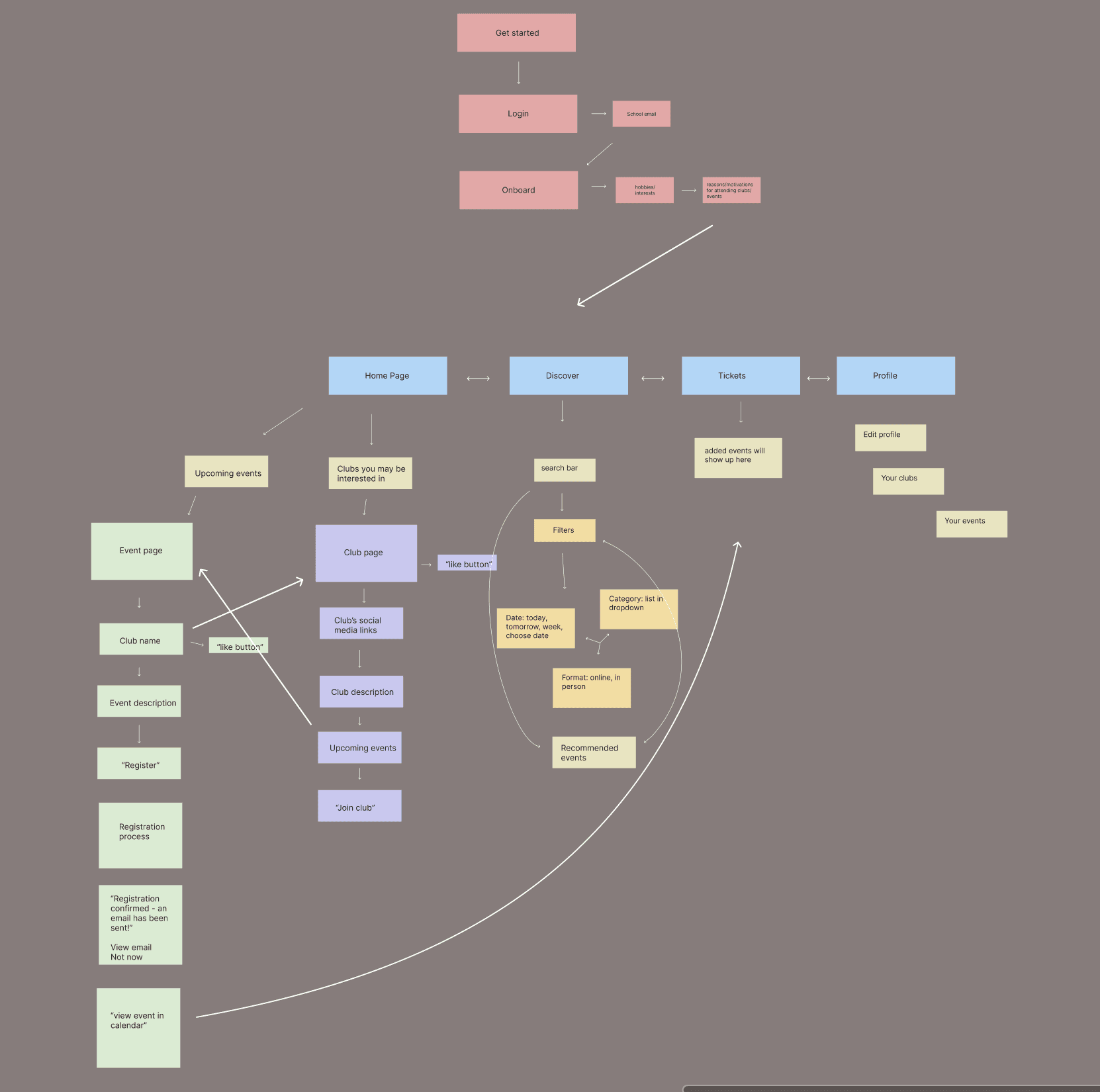
Rough Information Architecture

Low-Fidelity Prototype

Purpose
The goal of the low-fidelity prototypes was to validate structure, navigation, and key user flows before moving into visual design.

Onboarding & Home Page

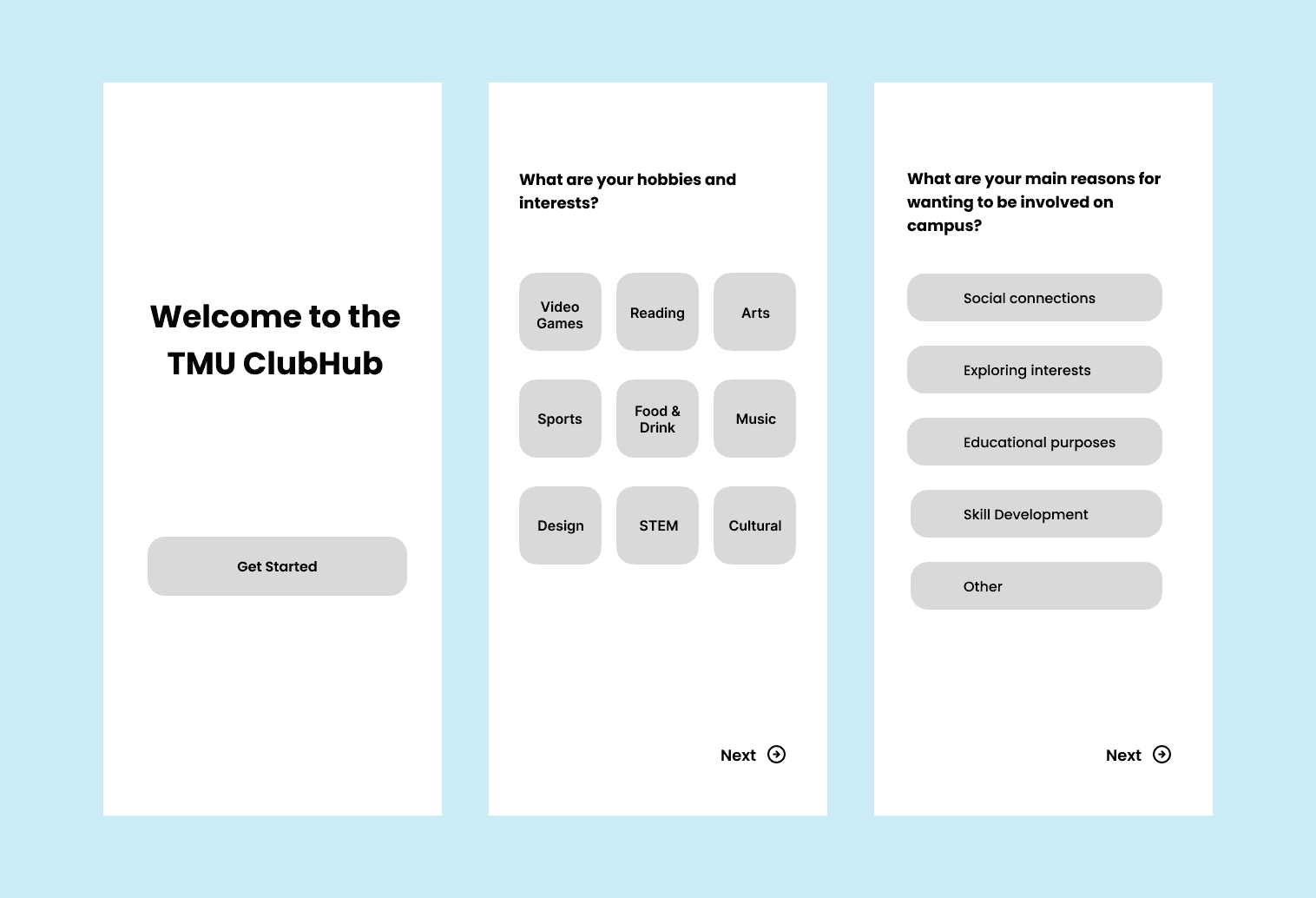
I designed the low and mid-fidelity onboarding flows that allow users to select interests and hobbies to personalize their experience. This step was informed directly by survey responses, where students expressed wanting to discover clubs and events that aligned with their personal interests and social goals.

The selected interests then display on the Home page, ensuring that students see relevant opportunities immediately rather than browsing through long lists.


LF Onboarding & Home Page

Event Discovery & Registration

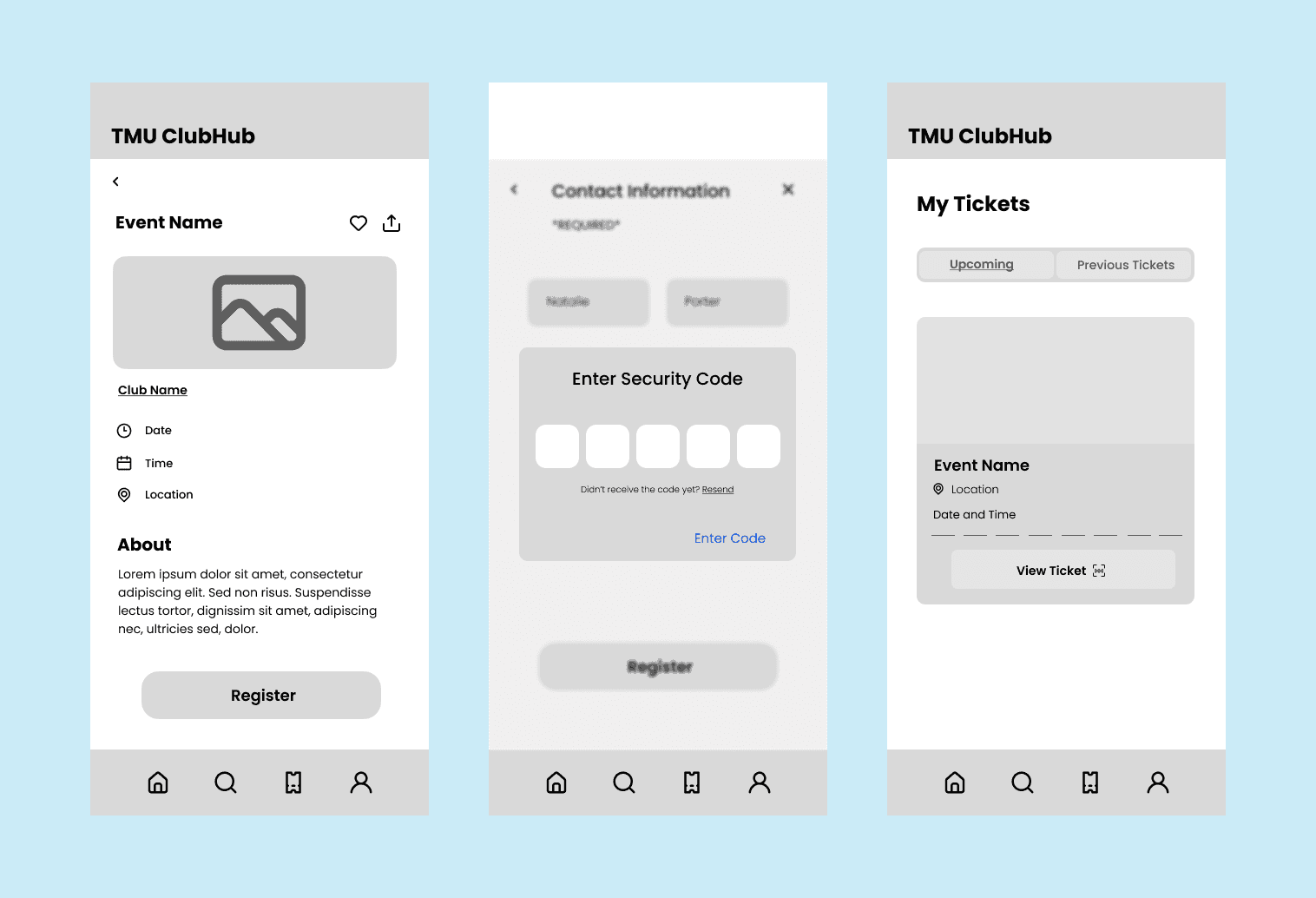
Event registration was a core flow of the app. Students can effortlessly discover and register for events through a few simple steps. Once registered, tickets are stored in a dedicated “Tickets” section, reducing the need to search through emails or external platforms.

This flow prioritizes efficiency and supports better planning for students with limited time.

LF Event Discovery & Registration

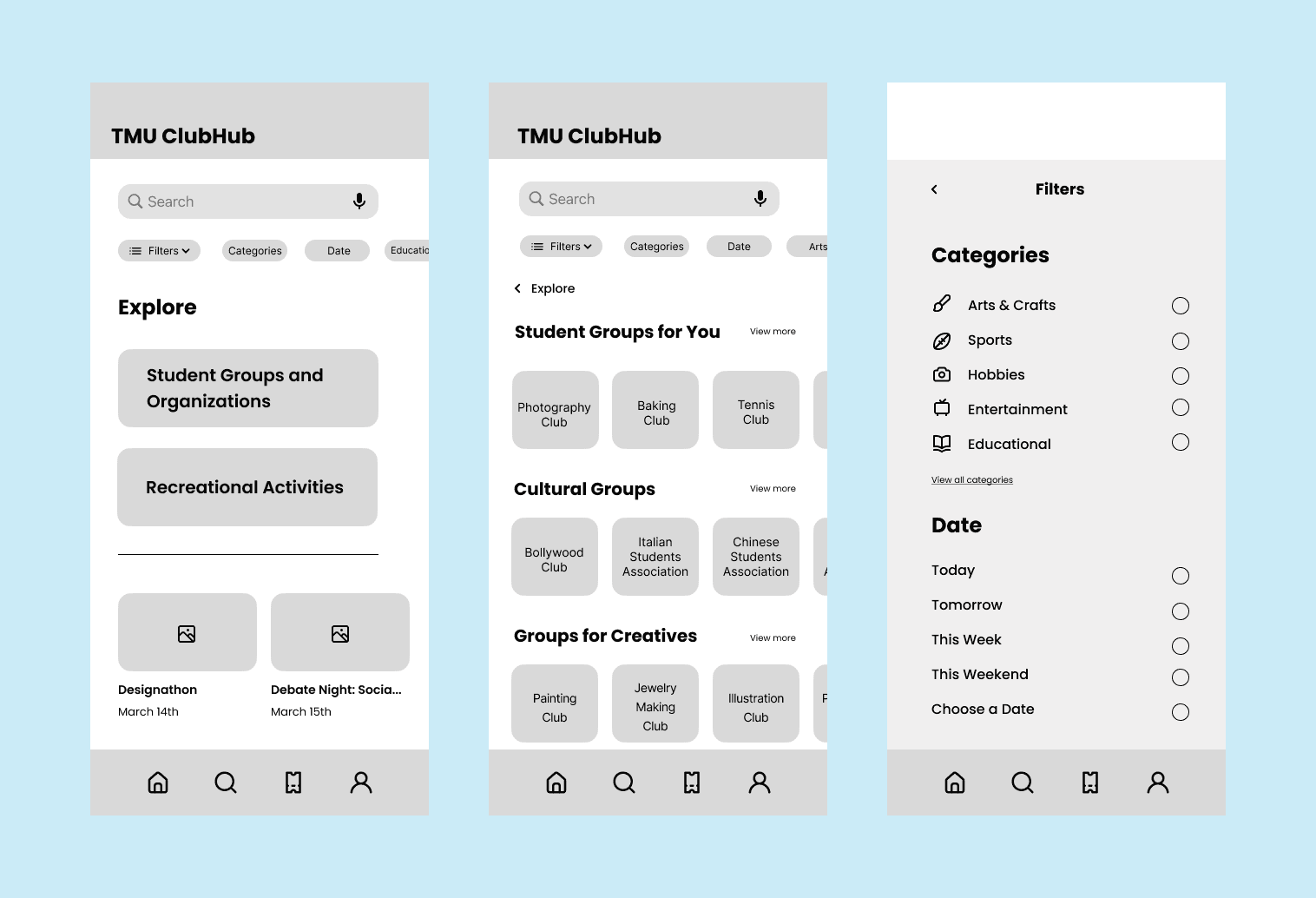
Discover Page & Category Structure

The Discover page merges the Student Groups Directory and Organizations into a single category and incorporates Recreation through three clear subcategories: SportsFitness & Wellness, and Specialty Activities.

This structure reduces confusion caused by overlapping platforms and allows students to browse based on interest rather than administrative classification.

LF Discover & Categories Page

User Testing & Iteration

I conducted usability testing using the low-fidelity prototype to identify usability issues and validate key user flows. I tested with three TMU students who expressed interest in using the app to discover campus events.

Each participant was given the same task:

Complete onboarding, register for an event from the Home page, and view your ticket on the Tickets page.

I ran two rounds of testing:

  • Round 1: Initial usability test with each participant

  • Round 2: Follow-up testing after iterating on identified issues

Key Insight: Authentication & Trust

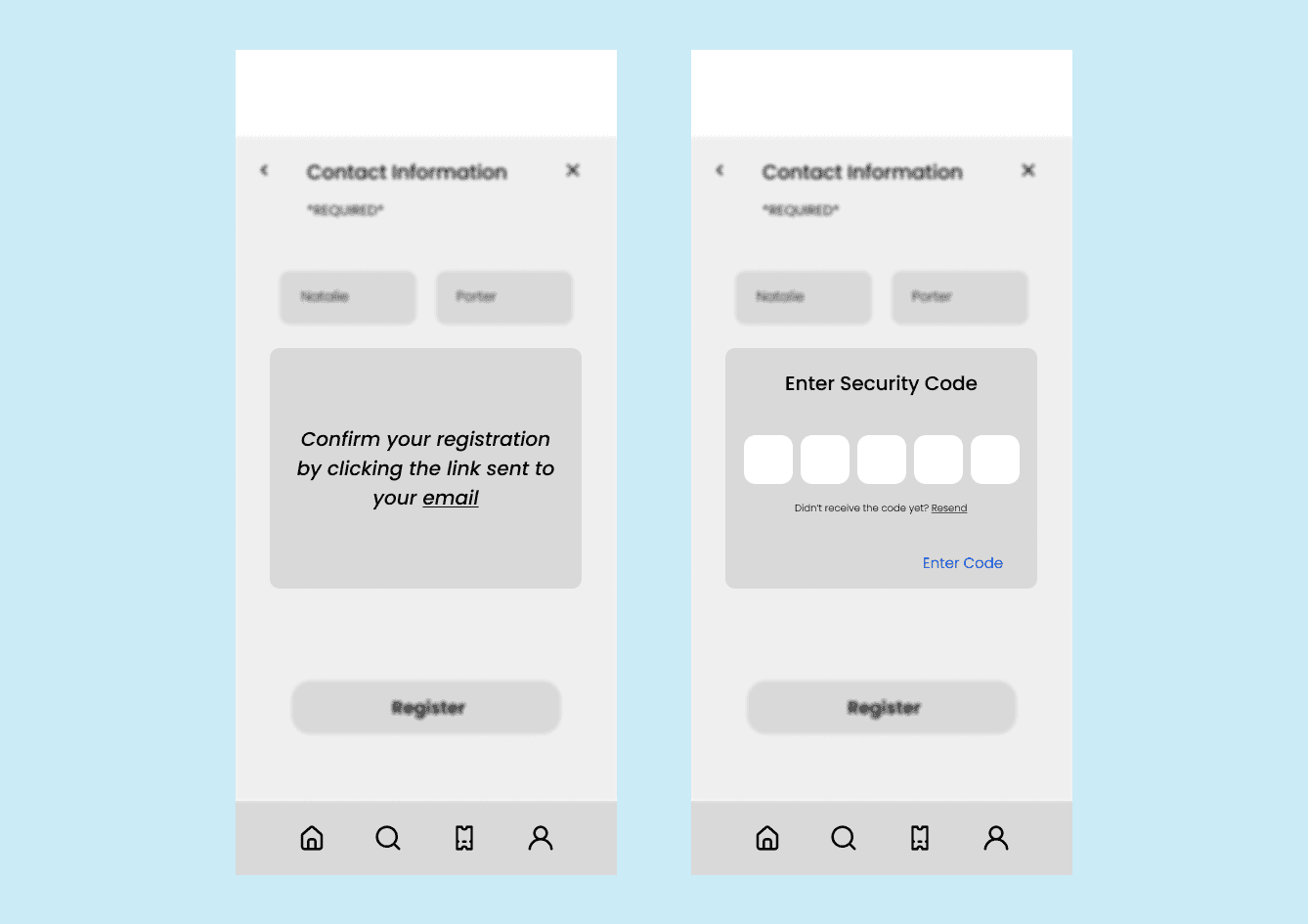
During testing, 2 out of 3 participants suggested changing the email verification flow. The original design required users to click a verification link sent via email, which participants described as feeling outdated and less trustworthy.

These users mentioned they preferred entering a verification code instead, noting that it felt more modern and familiar from other apps they use.

After further research, I found that one-time verification codes are now the most common authentication method across mobile apps, and that some users hesitate to click links in emails due to security concerns.

Previous LF Confirmation page via email link (left) vs current verification code page (right)

Iteration Made

Based on both user feedback and best practices, I replaced the email link verification with a verification code flow. This change:

  • Increased perceived security and trust

  • Reduced hesitation during onboarding

  • Made the interaction clearer and more intuitive

  • Better aligned with modern mobile app patterns

This update was carried forward into the high-fidelity prototype.

Final Screens

Onboarding → Event Registration Flow

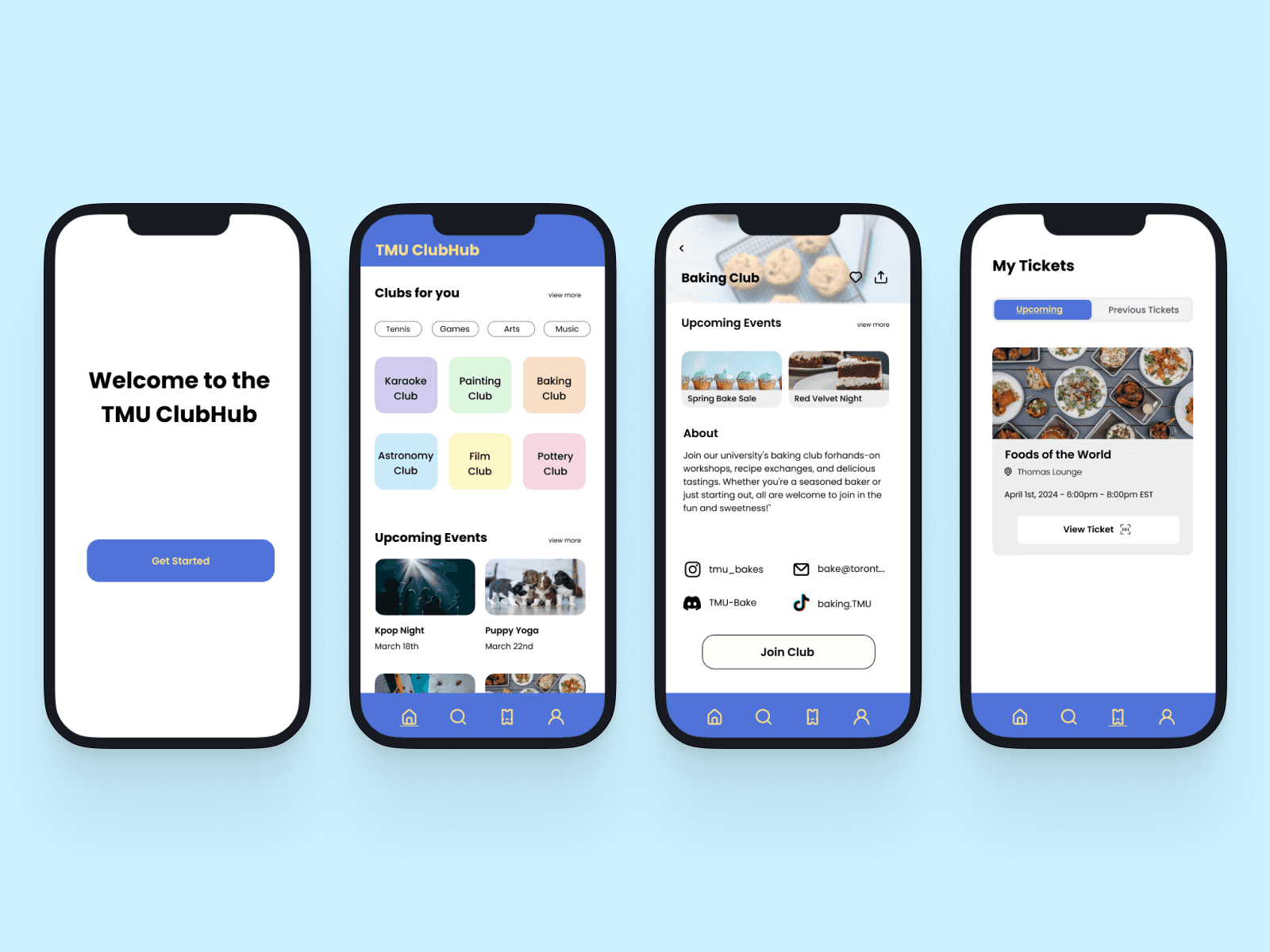
After onboarding, students can quickly discover relevant clubs and events from the Home page and easily register and join. This flow was intentionally designed to support students by prioritizing clarity, scannability, and simplifying actions into one step.

Registered events are automatically stored in the Tickets page, allowing students to easily access event details without relying entirely on email confirmations or external platforms.

After onboarding, join a club from the "Home" page and easily register for events, with tickets stored on the "Tickets" page

Design Decisions Reflected in High-Fi

The high-fidelity prototype reflects several key decisions informed by research and testing:

  • Interest-based onboarding to personalize discovery

  • Unified Discover structure that merges Student Groups, Organizations, and Recreation

  • Verification code authentication, implemented after usability testing feedback

  • Clear navigation hierarchy to reduce cognitive load

  • Mobile-first design, aligning with how students already find events

These decisions work together to simplify, save time, and make campus involvement feel more accessible.

Reflection

This project reinforced the importance of designing around real user behaviors rather than institutional structures. While students want to be involved, outdated systems and poor information architecture can become major barriers.

If I were to continue this project, I would explore:

  • Deeper personalization

  • Real-time club updates

  • Ability to apply to join a club’s executive team

  • In-app messaging between clubs and members

  • Integration with student calendars

  • Admin tools for clubs to manage content

Thank you for reading!

Process

Information Architecture

Through site analysis, I identified major structural issues across TMU’s platforms:

Student Groups

  • Only includes clubs officially registered with the TMSU

  • Limited categories

  • Many missing or outdated links

Organizations

  • Includes both registered and unregistered clubs

  • Overlaps heavily with Student Groups

  • No clear distinction between active and inactive clubs

Recreation

  • Activities listed alphabetically under “Classification”

  • Requires excessive scrolling

  • Inconsistent filtering between “Classification” and “Category”

This separation reflected administrative structure rather than how students actually search.


Information Architecture Decisions

  • To reduce confusion and cognitive load, I restructured the information as follows:

    • Merged Student Groups + Organizations into one unified category

    • Reorganized Recreation into three clear subcategories:

      1. Sports

      2. Fitness & Wellness

      3. Specialty Activities

    This approach prioritized interest-based discovery over institutional classification.


My breakdown of the Organizations, Student Group Directory, and Recreational sites

Ideation & Early Concepts 

  • With research and IA insights in place, I began exploring solutions that would:

    • Centralize information

    • Reduce navigation friction

    • Support quick scanning and planning

    Early concepts included:

    • A visual club directory with activity status

    • A master event calendar

    • Interest-based browsing

    • A tab-based navigation system (Clubs, Events, Recreation, Saved)

    I intentionally focused on simplicity and time-saving interactions, knowing that students often browse quickly between classes or on their commute.

Rough Information Architecture

Low-Fidelity Prototype

Purpose
The goal of the low-fidelity prototypes was to validate structure, navigation, and key user flows before moving into visual design.

Onboarding & Home Page

I designed the low and mid-fidelity onboarding flows that allow users to select interests and hobbies to personalize their experience. This step was informed directly by survey responses, where students expressed wanting to discover clubs and events that aligned with their personal interests and social goals.

The selected interests then display on the Home page, ensuring that students see relevant opportunities immediately rather than browsing through long lists.


LF Onboarding & Home Page

Event Discovery & Registration

Event registration was a core flow of the app. Students can effortlessly discover and register for events through a few simple steps. Once registered, tickets are stored in a dedicated “Tickets” section, reducing the need to search through emails or external platforms.

This flow prioritizes efficiency and supports better planning for students with limited time.

LF Event Discovery & Registration

Discover Page & Category Structure

The Discover page merges the Student Groups Directory and Organizations into a single category and incorporates Recreation through three clear subcategories: SportsFitness & Wellness, and Specialty Activities.

This structure reduces confusion caused by overlapping platforms and allows students to browse based on interest rather than administrative classification.

LF Discover & Categories Page

User Testing & Iteration

I conducted usability testing using the low-fidelity prototype to identify usability issues and validate key user flows. I tested with three TMU students who expressed interest in using the app to discover campus events.

Each participant was given the same task:

Complete onboarding, register for an event from the Home page, and view your ticket on the Tickets page.

I ran two rounds of testing:

  • Round 1: Initial usability test with each participant

  • Round 2: Follow-up testing after iterating on identified issues

Key Insight: Authentication & Trust

During testing, 2 out of 3 participants suggested changing the email verification flow. The original design required users to click a verification link sent via email, which participants described as feeling outdated and less trustworthy.

These users mentioned they preferred entering a verification code instead, noting that it felt more modern and familiar from other apps they use.

After further research, I found that one-time verification codes are now the most common authentication method across mobile apps, and that some users hesitate to click links in emails due to security concerns.

Previous LF Confirmation page via email link (left) vs current verification code page (right)

Iteration Made

Based on both user feedback and best practices, I replaced the email link verification with a verification code flow. This change:

  • Increased perceived security and trust

  • Reduced hesitation during onboarding

  • Made the interaction clearer and more intuitive

  • Better aligned with modern mobile app patterns

This update was carried forward into the high-fidelity prototype.

Final Screens

Onboarding → Event Registration Flow

After onboarding, students can quickly discover relevant clubs and events from the Home page and easily register and join. This flow was intentionally designed to support students by prioritizing clarity, scannability, and simplifying actions into one step.

Registered events are automatically stored in the Tickets page, allowing students to easily access event details without relying entirely on email confirmations or external platforms.

After onboarding, join a club from the "Home" page and easily register for events, with tickets stored on the "Tickets" page

Design Decisions Reflected in High-Fi

The high-fidelity prototype reflects several key decisions informed by research and testing:

  • Interest-based onboarding to personalize discovery

  • Unified Discover structure that merges Student Groups, Organizations, and Recreation

  • Verification code authentication, implemented after usability testing feedback

  • Clear navigation hierarchy to reduce cognitive load

  • Mobile-first design, aligning with how students already find events

These decisions work together to simplify, save time, and make campus involvement feel more accessible.

Reflection

This project reinforced the importance of designing around real user behaviors rather than institutional structures. While students want to be involved, outdated systems and poor information architecture can become major barriers.

If I were to continue this project, I would explore:

  • Deeper personalization

  • Real-time club updates

  • Ability to apply to join a club’s executive team

  • In-app messaging between clubs and members

  • Integration with student calendars

  • Admin tools for clubs to manage content

Thank you for reading!

Process

Information Architecture

Through site analysis, I identified major structural issues across TMU’s platforms:

Student Groups

  • Only includes clubs officially registered with the TMSU

  • Limited categories

  • Many missing or outdated links

Organizations

  • Includes both registered and unregistered clubs

  • Overlaps heavily with Student Groups

  • No clear distinction between active and inactive clubs

Recreation

  • Activities listed alphabetically under “Classification”

  • Requires excessive scrolling

  • Inconsistent filtering between “Classification” and “Category”

This separation reflected administrative structure rather than how students actually search.


Information Architecture Decisions

  • To reduce confusion and cognitive load, I restructured the information as follows:

    • Merged Student Groups + Organizations into one unified category

    • Reorganized Recreation into three clear subcategories:

      1. Sports

      2. Fitness & Wellness

      3. Specialty Activities

    This approach prioritized interest-based discovery over institutional classification.

My breakdown of the Organizations, Student Group Directory, and Recreational sites

Ideation & Early Concepts 

  • With research and IA insights in place, I began exploring solutions that would:

    • Centralize information

    • Reduce navigation friction

    • Support quick scanning and planning

    Early concepts included:

    • A visual club directory with activity status

    • A master event calendar

    • Interest-based browsing

    • A tab-based navigation system (Clubs, Events, Recreation, Saved)

    I intentionally focused on simplicity and time-saving interactions, knowing that students often browse quickly between classes or on their commute.

Rough Information Architecture

Low-Fidelity Prototype

Purpose
The goal of the low-fidelity prototypes was to validate structure, navigation, and key user flows before moving into visual design.

Onboarding & Home Page

I designed the low and mid-fidelity onboarding flows that allow users to select interests and hobbies to personalize their experience. This step was informed directly by survey responses, where students expressed wanting to discover clubs and events that aligned with their personal interests and social goals.

The selected interests then display on the Home page, ensuring that students see relevant opportunities immediately rather than browsing through long lists.


LF Onboarding & Home Page

Event Discovery & Registration

Event registration was a core flow of the app. Students can effortlessly discover and register for events through a few simple steps. Once registered, tickets are stored in a dedicated “Tickets” section, reducing the need to search through emails or external platforms.

This flow prioritizes efficiency and supports better planning for students with limited time.

LF Event Discovery & Registration

Discover Page & Category Structure

The Discover page merges the Student Groups Directory and Organizations into a single category and incorporates Recreation through three clear subcategories: SportsFitness & Wellness, and Specialty Activities.

This structure reduces confusion caused by overlapping platforms and allows students to browse based on interest rather than administrative classification.

LF Discover & Categories Page

User Testing & Iteration

I conducted usability testing using the low-fidelity prototype to identify usability issues and validate key user flows. I tested with three TMU students who expressed interest in using the app to discover campus events.

Each participant was given the same task:

Complete onboarding, register for an event from the Home page, and view your ticket on the Tickets page.

I ran two rounds of testing:

  • Round 1: Initial usability test with each participant

  • Round 2: Follow-up testing after iterating on identified issues

Key Insight: Authentication & Trust

During testing, 2 out of 3 participants suggested changing the email verification flow. The original design required users to click a verification link sent via email, which participants described as feeling outdated and less trustworthy.

These users mentioned they preferred entering a verification code instead, noting that it felt more modern and familiar from other apps they use.

After further research, I found that one-time verification codes are now the most common authentication method across mobile apps, and that some users hesitate to click links in emails due to security concerns.

Previous LF Confirmation page via email link (left) vs current verification code page (right)

Iteration Made

Based on both user feedback and best practices, I replaced the email link verification with a verification code flow. This change:

  • Increased perceived security and trust

  • Reduced hesitation during onboarding

  • Made the interaction clearer and more intuitive

  • Better aligned with modern mobile app patterns

This update was carried forward into the high-fidelity prototype.

Final Screens

Onboarding → Event Registration Flow

After onboarding, students can quickly discover relevant clubs and events from the Home page and easily register and join. This flow was intentionally designed to support students by prioritizing clarity, scannability, and simplifying actions into one step.

Registered events are automatically stored in the Tickets page, allowing students to easily access event details without relying entirely on email confirmations or external platforms.

After onboarding, join a club from the "Home" page and easily register for events, with tickets stored on the "Tickets" page

Design Decisions Reflected in High-Fi

The high-fidelity prototype reflects several key decisions informed by research and testing:

  • Interest-based onboarding to personalize discovery

  • Unified Discover structure that merges Student Groups, Organizations, and Recreation

  • Verification code authentication, implemented after usability testing feedback

  • Clear navigation hierarchy to reduce cognitive load

  • Mobile-first design, aligning with how students already find events

These decisions work together to simplify, save time, and make campus involvement feel more accessible.

Reflection

This project reinforced the importance of designing around real user behaviors rather than institutional structures. While students want to be involved, outdated systems and poor information architecture can become major barriers.

If I were to continue this project, I would explore:

  • Deeper personalization

  • Real-time club updates

  • Ability to apply to join a club’s executive team

  • In-app messaging between clubs and members

  • Integration with student calendars

  • Admin tools for clubs to manage content

Thank you for reading!